WebAI - 2026
An application for building applications, with AI as your assistant.
WebAI Application Building Platform

INTRODUCTION
Redefining a c-suite concept with design principals
Our Chief Product Officer(Tyler Maurer) had come to the design team with a rough concept of an application he would like to launch that he had built in Claude Code. The design team was tasked with taking the rough concept and rebuilding it from scratch. The team took the core functionality of the product and focused it around the use cases of our core users while applying design best practices.




TEAM & ROLES
Elevating an app is a team sport




THE CPO'S PROTOTYPE
THE PROBLEM
Refining the CPO’s concept into a solution for our user’s needs
Near the beginning of February, Tyler, our Chief Product Officer presented a concept he was working on in Lovable, to the design team. He then tasked the design team to take his concept, adapt it and present a vision for the product within 3 weeks. The team was asked to work in tandem with the engineering team to speed up development of the product so that we could have a demo-ready version to be released at SXSW 2026.

DEFINING THE PRODUCT
Focusing the product around the problem to solve
After our kickoff session, I worked with my product partner to break down the features included in Tyler’s initial concept. From there, I collaborated with the product team to define a more focused vision for what the application could become and core user problems it could potentially solve.
I worked closely with the product team to align on a vision for the product as a tool that would allow users to vibe-code their own suite of custom applications. We refined the original concept by focusing the feature set from the original prototype around that vision while introducing new functionality that was missing.

Chi and I presented this feature set to Tyler and our head of product. After receiving their approval, I got to work building WebAI’s Application Building Tool.
THE REBUILD
Building our best ideas into a cohesive vision
After building out initial concepts in isolation, Chen and I shifted into a period of heavy collaboration to evolve our new concept and flesh out the core features.
Application Highlights
Below is a selection of feature highlights from the rebuild application:
AI PROTOTYPING
Using cutting-edge tools to guide our development
As I worked through the core set of screens, I also built a working prototype using a combination of Figma Make, Claude Code, and Cursor. I presented both the designs and the prototype to our Product Manager and key stakeholders, where it became an important tool for communicating the complexity and vision of the new WebAI application.
Once the direction was refined, my Product Manager and I shared the work with Tyler and the Head of Product to gain alignment on the new vision and functionality. After receiving approval, we presented it to the engineering team for feedback.

ENG HANDOFF
Bringing AI into engineering handoff
Once we had sign-off from our business and product stakeholders, I moved into delivery mode alongside the product and engineering teams. Together, we finalized the scope for the SXSW demo and iterated heavily using both the Figma designs and a Claude Code prototype.
The prototype became an invaluable tool for communicating the vision and complex functionality of the application, while Figma remained the team’s source of truth throughout development. Its commenting, version history, and collaboration tools were indispensable during our tight timeline, keeping everyone aligned through the run up to our SXSW event.
SXSW DEMO
Built to test the market
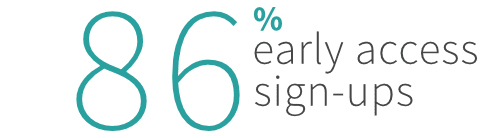
Over four weeks, I worked closely with Product, Engineering, and key stakeholders across the company to redefine WebAI’s new application from the ground up. The resulting product became the cornerstone of WebAI’s SXSW demo, where 86% of attendees signed up for early access and the company gained more than 760 new social media followers during the event.
While those results didn’t mean we had built the perfect product, they were a strong signal that the vision resonated with users. Just as importantly, the early-access signups gave the design team a passionate group of users to continuously test our roadmap with and refine the product around real user feedback.